Pro
Pro
Our biggest release so far: phones and tablets, a new look with five themes, a personal dashboard, cards on more than one board, boards you can open to everyone, four ways to read a whole project, PDF and HTML exports, live presence, templates, and a lot of polish. Two large areas ship as previews and are marked as such.
Added
Phones and tablets — a layout built for touch, chosen by how you point rather than by window size, so tablets get it in landscape too.
- Board bar: a floating pill with previous/next list, a + that adds and opens a card in view, and a ... for the header actions a phone has no room for.
- Swipe between lists, between cards, and pull a card aside, down (archive/delete) or up (its actions).
- Drag and drop reworked for touch, with feedback and no accidental text selection.
- Finger-sized menus, safe-area-aware layouts, bigger type, a header and toolbar that fold down to a 390px phone, a full-screen notepad.
Look and feel
- Five themes (Beta): Default, Dark, Elegant, Frosty, Dark Ice — from the user menu, or automatic to follow your OS; the top bar can carry its own. Rough edges remain in some dialogs.
- Instance-wide accent colour, set once in administration.
- Card density: Condensed, Medium, Spacious or Loose.
- Colour-blind mode for labels and list colours (protanopia, deuteranopia, tritanopia).
- Project backgrounds: a colour plus an optional tileable pattern, mirrored on the home-screen tiles.
- A Visual tab in settings gathers everything that decides how the app looks.
- Neighbouring lists with the same name and type read as one column; settings are per user and apply instantly across tabs.
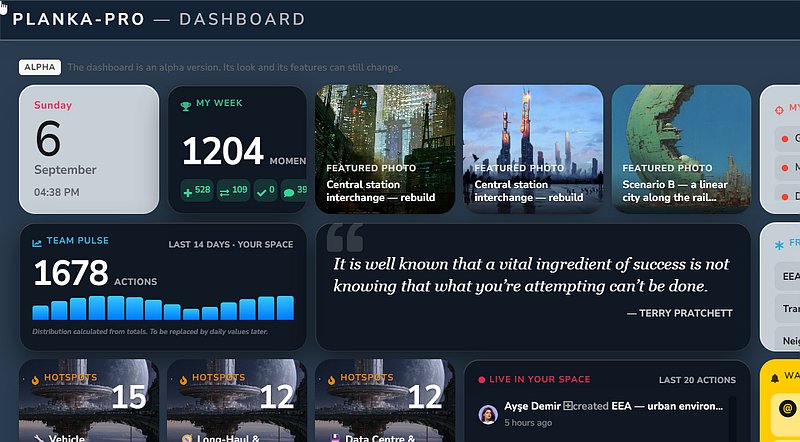
Home screen and dashboard (Alpha) — an early preview; panels, layout and settings will still change, and some panels are placeholders.
- Personal dashboard built from panels you pick: clock, my week, my focus, team pulse, arrivals, hotspots, activity, "important but forgotten", waiting on you, collaborators, and more. Each panel has its own settings.
- Notepad: a personal scratchpad on the home screen.
- Open a card without leaving the page, as an overlay from a panel, collection or search result, with comments, fields and attachments.
- Global search redesigned: cards, boards and attachments in one layout that reflows to narrow screens.
- PLANKA remembers where you left off (home scroll, last project, board position).
Boards and navigation
- Board overview: mini previews of every board in a project; tabs collapse into a dropdown when space is tight.
- Timeline view: dated cards as bars on a twelve-month axis — drag to move dates, group by member or label (editors only for the handles).
- Read a whole project at once: calendar, map, timeline and media wall across all boards, each still deciding what you may see.
- Media view: every attachment of a board, filterable.
- Saved filters (personal, per board) and filter by date (from/between/until, start or due).
- Flash recent cards: pulse what changed last, optionally on every board entry.
- Board movement modes (off / relative / delayed).
- Paste onto a board: text, links, images or files, with a preview; links become link cards.
- A deep link survives login, and "auto open the last site" reopens where you were.
Adding cards
- One card chooser everywhere: blank card, clipboard, and the templates the board offers — from every view, the inbox/archive/trash, the calendar, the map and the phone bar.
- Start a card of a particular type from the chooser's second page.
- A blank card is saved only once you write in it, and leaves nothing behind if closed untouched.
- Paste a card (Ctrl+V) from text, a link, an image or a file, after a preview; a link to a card here reveals it instead of duplicating.
- Turn a to-do into a card, taking its assignee with it.
Templates
- Templates live in template projects: library boards hold the cards you reuse. Keep your own catalog; catalogs shared with you or published globally are offered too.
- A board decides what it offers: pick templates from any catalog you can reach, order them, and choose the set each role sees.
- Save a card as a template from the toolbar, choosing where it lands.
- Board templates: publish a whole board as a global template, and decide which roles create freely and which only from a template.
- Demo data on request: an admin can generate (and auto-revert) a demo project.
Linked cards
- A card can appear on more than one board: paste its link with Ctrl+Y for a stand-in showing the original's content; what you write through it reaches the real card.
- The board you are on decides what you may do — the rights that count are the ones you hold where the link sits, not on the source board.
- Full or read-only: a read-only link refuses every change and wears a red corner; narrowed by any editor here, widened again only by an editor of both boards.
- List, members and labels stay local, so the same card can carry different people and labels on each board.
- A coloured frame marks it as a window; archiving, moving, unlinking and duplicating act on the stand-in.
Cards
- New cards open instantly and save only when you are done.
- Long descriptions load on demand, keeping big boards fast.
- The next occurrence of a recurring card shows as a chip with a countdown.
- Labels survive the archive and are restored even if deleted meanwhile.
- Separate start/due chips, a bottom bar with page indicator and next-card navigation, confirmation on duplicate.
Labels
- Project-wide labels: one shared vocabulary maintained in the project settings, marked with a globe in every board's picker; promote up or push down without losing it from cards.
- Label groups by type, context, attribute, area or topic; a group can be single-select (one status/priority per card).
- Weight and nudge level: heavy labels that go quiet resurface in the dashboard and nudge the responsible after 3, 7 or 14 days.
- Automatic contrast keeps text readable in every theme; optional rounded-pill labels.
Custom fields
- Fields now have a type: text, number, date, currency, yes/no, URL or dropdown, each with the right input and display.
- Dropdowns with predefined values, optionally allowing free entry.
- Repeatable field groups: many records on one card (contacts, line items, test runs), shown as a sortable table; up to 50 per card by default.
Attachments and images
- Inline image previews: a display-optimised copy; the original stays available, and admins can decide whether originals are kept.
- Attachments name themselves (IMG_20260714_183501.jpg becomes "Image").
- Delete or rename a single attachment from its row; individual attachments can be hidden from guests.
Working together
- Presence: online, idle or away on the avatar, on boards and in user lists; offline status can be hidden.
- Editing a description together: see when someone else is writing, ask to take over if they go idle, drafts kept locally.
- Share a card: a link to a single card for people outside the board, or ask a colleague to show you one of theirs.
- Teams: give a whole team access to a board at once, kept in sync; project managers can maintain a project's own teams; a team can be assigned to a card like a person.
- Accounts can be banned as well as deactivated.
Exports
- PDF export for boards and single cards (description, labels, fields, attachments, notes section).
- HTML export for boards: one self-contained file with images embedded.
Pinboards, public boards and guests
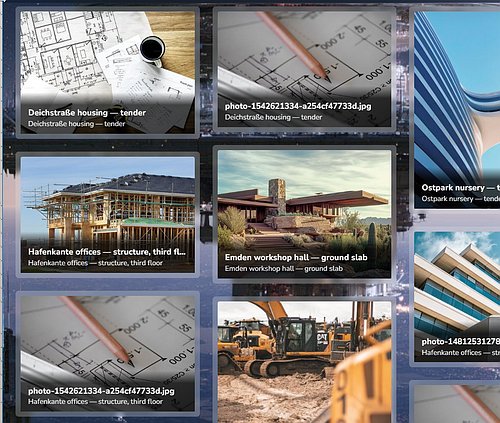
- Pinboards: open a board to everyone signed in — read-only, under their own name, nobody added to the member list.
- Public boards: open selected boards to visitors without an account, by link or in a directory; what they see is per board, and they cannot create or change anything.
- Update interval for visitors is a project setting (real time, or 3/5/15/60 minutes); signed-in users keep live updates.
Personal preferences
- Edit mode: always on, remembered, or off every time.
- An inactivity cover: a curtain with time, date and quote after a while idle; the press that lifts it does nothing else.
- A keyboard shortcuts panel in the user menu.
- Every setting that could not explain itself by its label now carries a hint.
Administration
- Two-factor authentication (TOTP) for non-SSO accounts: authenticator app, ten recovery codes, optional 30-day trusted browsers (listed, individually revocable); admins can reset 2FA. OIDC logins are unaffected.
- Auto-logout on inactivity (2 minutes to a week, or never) with a 30-second warning; activity in any tab keeps you signed in.
- Delete permission can be revoked: editors keep editing but lose permanent removal; on by default.
- Login rate limiting: failed sign-ins counted per address and per account; wrong second-factor codes counted against the pending login and end it when spent.
- One edit dialog per user (profile, credentials, API key, avatar); login welcome message (Markdown) and cover set in administration.
LOG_FILE=nonekeeps console output only;SERVER_INSTANCESsets the worker count;OIDC_END_SESSION_ON_LOGOUT=falseleaves you signed in at your provider;BACKUP_PASSPHRASEencrypts the backup archive.
Changed
- Boards scroll freely on desktop instead of snapping list by list (see board movement modes).
- Image downloads default to the display-optimised copy; the original is still one click away in the viewer.
- Redesigned user settings and About dialog, with clearer messages when a username, e-mail or password is rejected.
- A team is managed by whoever owns it — instance-wide teams by admins, a project's teams by its managers; no one is offered another project's teams any more.
- The file log is capped at 10 MB across three rotating files.
- The Helm chart mounts
/app/.tmpas an emptyDir in every configuration (tempStorage.sizeLimitcaps it). - PLANKA warns on start when
SECRET_KEYis the example key, missing, or shorter than 32 characters.
Fixed
- Emoji and special characters in avatar initials
- S3 request checksum calculation
- Excessive memory use from unlimited proxy file descriptors
- Readability in dark mode across dialogs, the editor and administration
- Card dragging: grab offset, stacking order, redundant scrolling
- A due date picked in the afternoon is due at end of day, not the minute you picked it
- A drag interrupted by switching windows no longer swallows your next click
- Reopening a board while it is being worked on no longer takes the tab down
- Cards opened away from their board support comments, restoring, moving and deleting
- A failed upload no longer leaves its temporary file behind
- A single-string OIDC role claim is understood, and a mapping that matches nothing now says so in the log
- Missing translations across the dashboard, search, presence, teams and card navigation
Security
- The second factor is asked for even when the terms have changed. Accepting the terms handed out a full session before the second factor was reached, so someone with only the password could sign in without it. Only instances that changed their terms text were exposed; the stock terms never trigger it.
- A file route stays inside the directory it serves. Shared files, avatars, background images and favicons resolved their path against a shared upload root, so a request could walk into the directories behind a session check. Each route is now confined to its own directory, on disk and on S3.
- A link preview cannot be steered onto the internal network. Redirects and page-declared icons were followed without re-checking the address; every hop, and the icon's own address, is now checked, and private, loopback and link-local addresses (including
169.254.169.254) are refused. - A ban survives a single sign-on. A ban was read on password login only, so a banned user could sign back in through their identity provider and be reactivated on the way. Every login path now reads it.
- A guest can no longer copy out what a board hides from it by saving a card as a template.
- Leaving a group takes its board access with it — removal used to leave the granted board memberships behind.
- A board offers only the templates whoever set it up can reach; foreign template ids are dropped rather than pulled across in full.
- Group rosters stay with the people who administer them: a guest no longer receives every bound team's members and their profiles.
- A card's record list asks about the card, not merely the board, and a card can no longer be moved onto a collection board.
- The user search answers within your own boards and projects and turns the public visitor away, instead of handing out the whole directory.

Written by
Daniel Hiller